
CART
0
0
YOUR CART

Cash Discount Price
Online / Cash Payment
| General Information | ||
| Pen Type | Battery-free |
|
| Active area | 9"x 5"(230.76mmx 130.16mm) |
|
| Tilt | 60 Degrees |
|
| Connectivity Mode | USB 5V (Type -C Port Only) |
|
| Reading Height | 10 mm |
|
| System Requirement | Win 10/9/7 & MAC 10.10 above |
|
| Others | Buttons and Shortcuts: 8 Buttons + Mechanical Wheel + Virtual Wheel + Indicator Light |
|
| Display Information | ||
| Resolution | 5080 LPI (Lines per inch) |
|
| Report Rate | Max ≥200 RPS |
|
| Pressure Sensitivity | 8192 Levels |
|
| Others | Special Feature: Android Support: 6.0 and Above | |
| Warranty Information | ||
| Warranty | 01 Year Warranty | |
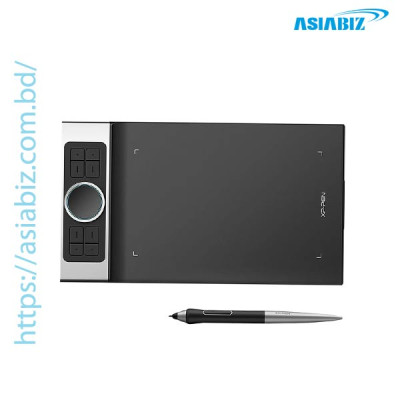
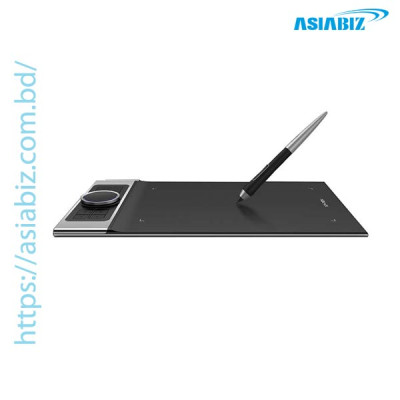
The XP-Pen Deco Pro Small Graphics Drawing Tablet
is a compact creative pen tablet designed for digital drawing, illustration,
graphic design, photo editing, handwriting, online teaching, and other creative
tasks. Its 9 × 5-inch active drawing area provides a comfortable balance
between usable workspace and portability, making it suitable for students,
digital artists, designers, and creators who do not want an oversized tablet on
their desk.
The Deco Pro Small combines 8192 levels of pressure
sensitivity, up to 60° pen tilt, a PA1 battery-free stylus, 8 programmable
shortcut keys, and XPPen's dual-wheel control system. The outer mechanical
wheel and inner virtual wheel/trackpad provide convenient control over functions
such as zoom, brush size, scrolling, and other customizable commands. The XP-Pen
Deco Pro Small Graphics Tablet is around BDT 11,900 to BDT 15,200.
9 × 5-Inch
Working Area: The Deco Pro Small provides a 9 × 5-inch active drawing
surface, offering enough room for illustration, sketching, photo editing,
handwriting, and other creative tasks while remaining more compact than the
larger Deco Pro Medium.
8192 Levels
of Pressure Sensitivity: The included stylus supports 8192 levels of
pressure sensitivity, allowing compatible creative applications to respond to
changes in pen pressure for different line thicknesses and brush effects.
Up to 60°
Tilt Support: The Deco Pro supports up to 60 degrees of pen tilt, providing
additional control for shading and brush-angle effects in compatible drawing
applications.
PA1
Battery-Free Stylus: The included PA1 stylus is battery-free, so it does
not require charging or disposable batteries. XPPen lists the pen at
approximately 13.3 g and includes side-button functions for convenient control
while drawing.
Dual Wheel
Control System: One of the standout features of the Deco Pro series is its
dual-wheel design. The outer mechanical wheel can be used for functions such as
zooming or brush-size adjustment, while the inner virtual wheel can work as a
trackpad or be assigned to other commands through the driver.
8
Programmable Shortcut Keys: The tablet includes 8 customizable express keys
that can be assigned to frequently used commands in compatible software,
helping reduce repeated keyboard use during creative work.
USB-C
Connectivity: The Deco Pro uses a USB-C interface for wired connectivity.
Its symmetrical design also allows the tablet to be rotated to different
orientations, including 0°, 90°, 180°, and 270°, according to the user's
preferred setup.
Android
Device Support: The Deco Pro series can connect to compatible Android 6.0
or later smartphones and tablets. XPPen notes that Android operation uses
vertical screen mode and that compatibility can vary between devices.
Broad
Software Compatibility: XPPen lists support for major creative applications
including Adobe Photoshop, Illustrator, Clip Studio Paint, GIMP, Krita,
MediBang, SAI, Painter, FireAlpaca, and Blender 3D, depending on the operating
system and software environment.
Windows,
macOS & ChromeOS Support: The Deco Pro series supports Windows 7 or
later, macOS 10.10 or later, Android 6.0 or later, and XPPen also lists
ChromeOS compatibility for the product line.
There are
many reasons to buy XP-Pen Deco Pro Small Graphics Tablet from Asiabiz
Technology, such as the company being an authorized reseller of XP-Pen,
providing genuine products with applicable warranty support, and issuing a hard
copy invoice that clearly mentions the product name, serial number, purchase
details, and warranty information. Asiabiz Technology also has a physical shop
where customers can visit for product consultation and support, along with
reliable after-sales service to assist customers with product-related issues
after purchase.
Asiabiz Technology provides the best after sell
service to clients. You can get the best support almost anytime by contact in
our hotline at ‘09678221422’ or our sales and technical team’s number
at01404-466160-61-62-63-66. We believe that providing the best service helps
build strong relationships with our clients.
Q: What is the working area of the XP-Pen Deco Pro Small?
A: The XP-Pen Deco Pro Small has a 9 ×
5-inch active drawing area, providing a useful balance between drawing space
and portability.
Q: Does the XP-Pen Deco Pro Small support 8192 pressure levels?
A: Yes. The Deco Pro supports 8192 levels of
pressure sensitivity, allowing compatible software to respond to different levels
of pen pressure.
Q: Does the XP-Pen Deco Pro Small support pen tilt?
A: Yes. It supports up to 60° tilt
recognition, which can be used for shading and natural brush effects in
compatible software.
Q: Does the Deco Pro Small pen need charging?
A: No. The included PA1 stylus is
battery-free, so it does not need to be charged or use replaceable batteries.
Q: What does the dual wheel do on the XP-Pen Deco Pro Small?
A: The tablet combines an outer mechanical
wheel and an inner virtual wheel/trackpad. They can be configured for controls
such as zooming, scrolling, changing brush size, and other software functions.
Q: What is
the price of XP-Pen Deco Pro Small Graphics Tablet?
A: The price XP-Pen Deco Pro Small Graphics Tablet around BDT 11,900 to BDT 15 ,200.
Get specific details about this product from customers who own it.
Free shipping on orders BDT 15,000/-
24×7 support every day
Special offer

Secure System
2025©ASIABIZ | Developed by SYP Solutions Ltd.


